Research by: Alexey Bukhteyev
- OpenAI recently introduced Lockdown Mode, an optional advanced security setting designed to protect sensitive user data from prompt injection-based exfiltration attacks.
- Check Point Research discovered a vulnerability that allowed attackers to bypass Lockdown Mode, rendering its core protections ineffective.
- The vulnerability exposes a wide attack surface, enabling silent exfiltration of entire chat history, credential theft via phishing, and malware delivery.
- In ChatGPT Classic, the attack requires zero user interaction: simply having a conversation is enough to trigger silent data exfiltration.
Introduction
Earlier this year, Check Point Research disclosed a security flaw in ChatGPT’s code-execution runtime that allowed sensitive conversation data to be silently exfiltrated to an attacker-controlled server through DNS tunneling, a hidden outbound channel that bypassed the runtime’s network isolation. A fix for this issue was promptly deployed.
Moreover, OpenAI later introduced a new security feature: Lockdown Mode.
Lockdown Mode is an optional advanced security setting for logged-in ChatGPT users. Its purpose is to reduce the risk that a prompt-injection attack can exfiltrate sensitive data by causing ChatGPT or one of its tools to make outbound web, app, connector, or file-download requests. A classic example, described in OpenAI’s own write-up on URL safety, is an attacker tricking the AI into loading a link such as attacker.example/collect?data= — the private data ends up in the attacker’s server logs even though nothing suspicious ever appears in the chat.
Recognizing that prompt injection remains a persistent risk regardless of implemented guardrails, Lockdown Mode mitigates it by cutting off the channels through which data could leave the conversation. When enabled, it restricts live web access to cached content, blocks the loading and display of images from the internet, disables network requests from Canvas-generated code, and turns off Deep Research, Agent Mode, live connectors, and file downloads.
We found a vulnerability in ChatGPT that allowed an attacker to bypass Lockdown Mode and perform covert exfiltration of chat data to an external server.
Potential attack scenarios involving this vulnerability were not limited to chat data leakage. The vulnerability allowed for manipulation of the ChatGPT Classic interface, including displaying popup windows with arbitrary content, opening the door to a wide range of phishing attacks.
The attack could be carried out in several ways: through a malicious prompt, a malicious GPT, or a shared chat.
The following sections cover the technical details behind the vulnerability and walk through the possible exploitation scenarios.
Technical Details
On February 2026, OpenAI added the HTML page preview feature into ChatGPT code blocks. It looks like the following:
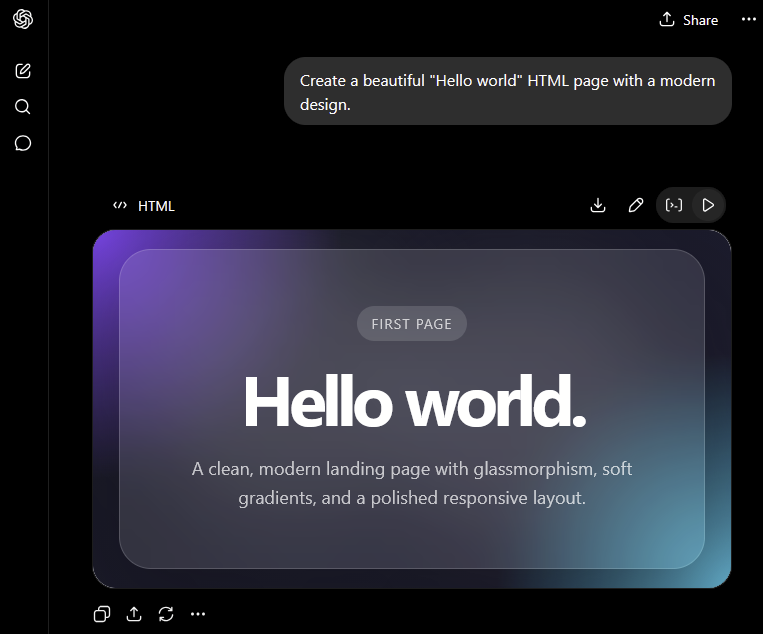
Of course, the implementation includes several safeguards around this feature, since rendering user-controlled HTML with JavaScript inside the ChatGPT interface could otherwise create a direct path for private-data exfiltration.
The most obvious attack scenarios include:
- Embedding an external image whose URL includes data from the chat:
- Embedding an external link:
">Download ChatGPT updateThis would allow attackers to place convincing social-engineering lures directly inside the ChatGPT interface and distribute them through shared chats. - Opening a popup window with an arbitrary URL, either through a link with the
target="_blank"directive:" target="_blank">Click meor through JavaScript:window.open("This scenario would be especially risky in the ChatGPT Classic client, where users may perceive the popup as part of the trusted application context. - Reading cookies or
localStoragedata forchatgpt.com. This would create a session-compromise risk.
These scenarios are effectively mitigated through several layers of isolation and runtime enforcement.
The rendered HTML is placed inside a sandbox, separating user-controlled content from the main ChatGPT application context, preventing the rendered page from directly accessing the parent document, ChatGPT UI state, cookies, or localStorage associated with chatgpt.com.
All attempts by the page to send data to an external resource, or load remote images, scripts, links, or open arbitrary external URLs are intercepted by the sandbox and surfaced as warnings:
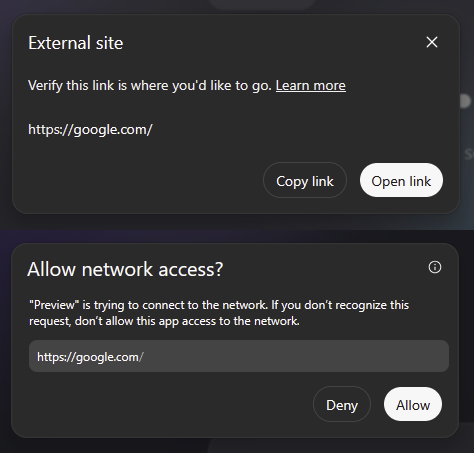
The sandbox is implemented in two nested iframes. If we look at the implementation, we see that the sandbox doesn’t restrict some actions in the iframe. For example, the allow-popupsallow-popups-to-escape-sandbox

The popups are controlled in a different way. The sandbox scripts redefine the window.open function:
window.open: h=>{if(!h)return null;const{location:f}=r;return an(o,f,h),null}
Thanks to that, when the webpage displayed in the iframe tries to open a popup, ChatGPT does not allow this until the action is approved by the user. When the page tries to open a popup with empty URL or about:blank the function just returns null , and the user does not even see a notification.
However, popups are not explicitly restricted by the iframe sandbox, because it has the allow-popups token.
Therefore, if we could get a real window.open function, we would be able to open a popup, bypassing the HTML sandbox restrictions, and even the Lockdown Mode. In fact, we can create a one more nested iframe inside our sandboxed page, and use its contentWindow.open function:
window.open("about:blank"); // blocked

// creating a nested iframe
var f = document.createElement('iframe');
document.body.appendChild(f);

f.contentWindow.open("about:blank"); // works
Further, having managed to open a pop-up window, the attacker can place arbitrary HTML code in it, which will no longer be executed in the sandbox, since the token allow-popups-to-escape-sandbox is present.
Attack surface: data exfiltration, phishing and malware downloding in a trusted interface.
This vulnerability opens a wide attack surface. It could enable the covert theft of entire chat history and uploaded files, the distribution of malware disguised as a legitimate update, and even credential theft. Below, we walk through several scenarios and explain how each one works.
Malware Delivery Through a Spoofed Application Window
Typically, default browser settings prevent JavaScript from opening pop-up windows. Opening a new window normally requires an explicit user action, such as clicking a link or a button.
An attacker needs to implement a plausible decoy to trick the user into clicking on a generated preview. Since the attacker controls the content of the generated page, crafting a convincing lure is straightforward. The window that opens will retain the ChatGPT application’s icon, while the title is controlled by an attacker, creating the impression that the user is still interacting with the ChatGPT application. This, for example, can be used to trick the user to download malware disguised as an application update. The ChatGPT Classic app does not allow automatic file downloads, so to download a file, the user must additionally click on the link.
This scenario is even easier to implement in a browser, as automatic downloads are not blocked. Furthermore, the victim doesn’t even need to have an account, and the attacker only needs to share a chat containing a malicious page, making any clicks on content in shared chats dangerous:
Zero-Click Exploitation in ChatGPT Classic
We found that window.open in the Electron-based ChatGPT Classic application works even without a user gesture. This makes the vulnerability significantly more dangerous: an attacker could silently exfiltrate data without requiring any interaction from the user, simply having a conversation would be enough to trigger the attack. This is demonstrated in Video 1, where a malicious GPT silently leaks chat messages to an attacker-controlled server.
Beyond that, we also found it was possible to reload content in the main ChatGPT application window and perform certain actions on behalf of the user, such as forcibly signing them out of their account. This could allow an attacker to craft a convincing lure and trick the user into re-authenticating on an attacker-controlled page, thereby silently stealing their credentials.
Conclusion
Check Point Research responsibly disclosed this vulnerability to OpenAI. On September 18, 2026, OpenAI informed us that it had deployed a fix by removing the allow-popups and allow-popups-to-escape-sandbox permissions from the outer HTML-preview sandbox iframe. We subsequently retested the issue and confirmed that the exploitation technique described in this article no longer works.
As AI assistants evolve into full execution environments, running code in the cloud and rendering content on the client side, all while handling medical records, financial data, and other highly sensitive information, every new capability expands the attack surface, including features built purely for convenience.
Guardrails and the built-in security features of AI agents and applications help mitigate threats, but they still offer no absolute guarantee of protection. That is worth remembering before entrusting AI with sensitive information or granting it full access to your computer. Securing these systems requires looking beyond individual features and considering the platform as a whole. The benefits of modern AI assistants are enormous, but adopting them safely demands careful attention to every layer, including the ones users never think about.