It started with a fire drill
In March, our SOC watched a phishing-as-a-service operation turn Railway, a developer cloud platform with a spotless IP reputation, into a token-harvesting engine. Device code phishing lures hit 344 organizations across five countries in under three weeks. Microsoft had no reason to score those logins as risky. That was the whole point.
So we did something we’d never done before. We hand-built a Conditional Access policy blocking Railway’s IP ranges, validated it against 14 days of fleet traffic, and pushed it to every eligible Managed ITDR tenant. It stopped 305 attack attempts at the door. Zero legitimate logins were affected.
Then the attackers moved to new infrastructure. They always do.
That’s the problem we built Adversary Infrastructure to solve. It’s the newest capability in Huntress Managed ITDR, and it turns that one-time emergency response into continuous protection. When one tenant gets hit, every tenant gets the block. We call it herd immunity for identity.
Attackers are renting clean infrastructure and scaling with AI
The Railway campaign told us something about how identity attacks work now. Across 344 victims, we found no two identical phishing lures. Each one was tailored enough to slip past email filtering. That kind of variety at that kind of volume means automation or AI is writing the lures. The group behind it, EvilTokens, sells a storefront with AI workflows for bypassing filters, personalizing pretexts, and hunting inboxes for wire fraud targets. It even has a 24/7 support desk.
The infrastructure side has changed too. Attackers don’t need to buy bulletproof hosting anymore. They rent clean, cheap, trusted cloud space, stand up a token relay in minutes, and tear it down when it’s burned. Developer platforms, VDI tunnels, and AiTM relays all look legitimate to Microsoft’s risk scoring until someone proves otherwise.
The scale is hard to overstate. In a single 14-day window, 5,086 distinct attacker IP addresses hit the Huntress fleet. Partners can’t curate blocklists at that pace. Nobody can, by hand.
What Adversary Infrastructure is
Adversary Infrastructure blocks attackers at the Microsoft 365 sign-in, before they ever get a session.
Figure 1: Adversary Infrastructure in the Huntress Platform
When the Huntress SOC confirms the hosting, relay, or proxy infrastructure behind a compromise in one tenant, we turn it into a blocking Conditional Access policy in every eligible, opted-in tenant. Attacks from that infrastructure fail at sign-in instead of becoming incidents you have to clean up.
It’s precision blocking, sourced from real attacks we’ve already investigated across the 17M+ identities we protect. Only the IP ranges that are bad, nothing else. Huntress maintains it end to end. There’s no blocklist for you to curate, no policy for you to write, no threat feed for you to consume. And it’s included in Managed ITDR for Microsoft 365 at no extra cost.
How it works
The whole loop runs from one confirmed incident to fleet-wide blocking, often the same day.
The SOC confirms a compromise with a real incident in a real tenant, with the hosting, relay, or proxy addresses behind it.
Detection engineers validate the infrastructure. It has to be datacenter or hosting space, scoped tightly to the evidence, with zero legitimate logins anywhere across the fleet and confirmed reports from at least two unrelated partners. A second engineer reviews every nomination. If real users log in from an address, it doesn’t ship.
Huntress deploys the block. New campaigns go to our own canary tenants first. Then one blocking policy with one named location per campaign – each labeled [HUNTRESS] – roll out to every eligible, opted-in tenant.
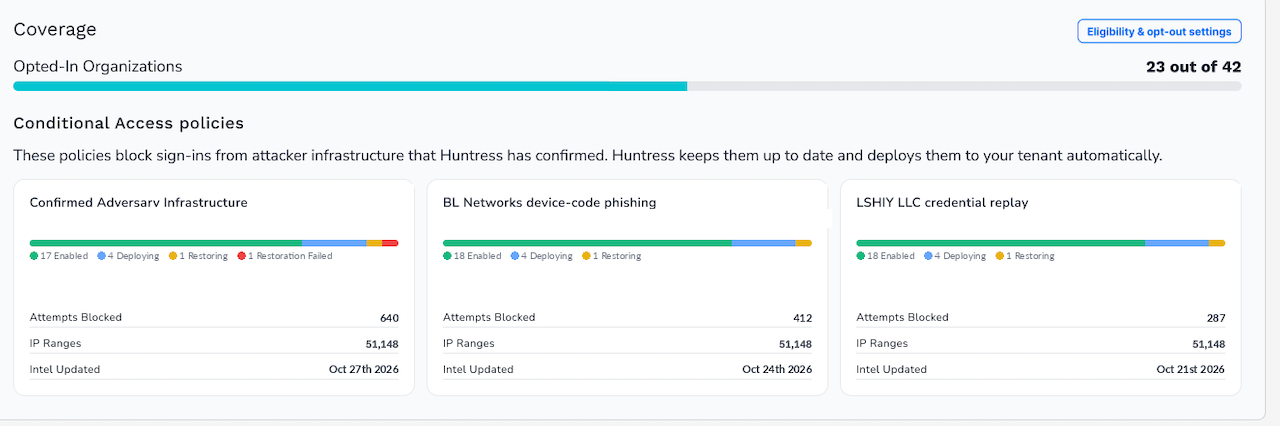
Figure 2: Conditional Access policies by campaign in Adversary Infrastructure
The next attack fails at sign-in. No token is issued. The attack never becomes an incident.
You get the receipt. Every block produces a Low severity incident report naming the targeted identity, source, and campaign, and the credential the attacker tried to use gets rotated.
We check every tenant daily, repair drift, and update ranges as attackers rotate. We never touch policies you authored. Tenants that can’t run Conditional Access still get the same detections and incident reports, just after the sign-in instead of before.
Two campaigns that brought you Adversary Infrastructure
Every campaign we’ve turned into fleet-wide protection started as somebody’s very bad day. Here are two.
LSHIY LLC: 81 million login attempts from one IPv6 range. Three months after Railway, our SOC spotted a password spray replaying validated credentials through ROPC, a legacy auth flow that skips the MFA prompt entirely. It compromised 78 accounts across 64 organizations. Here’s the part that stung: 55 of those accounts had active Conditional Access policies requiring MFA. The policies looked right. They just didn’t cover the flow the attacker used. LSHIY is now a live Adversary Infrastructure campaign. The next tenant that range touches blocks it at sign-in, whether or not its MFA policy has a gap.
1337 Services GmbH: ten weeks of token replay. Between July and September, an attacker captured sessions through AiTM relays and replayed the stolen tokens from a German hosting provider’s 193.26.115[.]0/24 IP range. We responded at 79 organizations: 497 successful sign-ins against more than 200,000 failed attempts. The operator rotated through six addresses in that range, one after another, with quiet periods between phases. A block written for one address did nothing against the next. Microsoft flagged them individually. Range-level blocking, maintained by Huntress and updated as the attacker moves, is built for exactly this pattern.
In both cases, the first tenants hit paid the price of cleanup: rogue devices, wiped MFA methods, hidden inbox rules, a payroll email sent to an outside CPA. With Adversary Infrastructure, the next tenant never gets that far.
Where Managed ISPM fits
If you’re wondering why Conditional Access blocks live in ITDR when Managed ISPM already manages Conditional Access, here’s the clean answer.
ISPM is posture. It deploys broad, durable controls that close whole classes of attack: block device code flow, restrict legacy auth and ROPC, require MFA for all apps. These controls aren’t aimed at any one adversary. They’re the baseline, and they stay in place. Every policy runs in Learning Mode for 14 days first, so nothing breaks.
Adversary Infrastructure is response. It’s narrowly scoped to the exact IP ranges behind incidents the SOC has already reported. It changes as campaigns rotate. Every block fires an incident report. Blocking device code flow is an ISPM policy. Going after Railway is an ITDR policy. Both are Conditional Access, doing different jobs.
They’re also better together. ISPM built the plumbing and the expertise to deploy Conditional Access across thousands of tenants without locking anyone out. That’s what let us turn the Railway response into a product at all. Posture closes the door. Response catches whoever’s still trying the handle.
Already using Managed ITDR? Turn Adversary Infrastructure on to unlock this new protection
Adversary Infrastructure is live in Managed ITDR for Microsoft 365 starting today, November 5.
Existing ITDR partners are opted out by default and can turn it on from the ITDR settings page. Partners onboarding from today forward are opted in by default. Eligible tenants need Entra ID P1 or P2 (Business Premium, or E3 with P1, and up), Security Defaults off, and a healthy, fully onboarded tenant in Huntress.
You must be opted in to be protected, and every tenant you opt in strengthens the herd.
Want the full story? Join me, Rich Mozeleski, and Matt Anderson on November 19 for the livestream Herd Immunity for Microsoft 365: How We Stop Attacks at Sign-In. We’ll walk through the campaigns, the nomination gate, and what’s coming next.
Ready to try out Adversary Infrastructure in Managed ITDR? Start your free, 14-day trial of Managed ITDR today.