
The pCloud Pass password manager suffered a cyberattack, with users reporting that unknown devices had connected to their accounts even with two-factor authentication (2FA) enabled.
The incident was first reported by numerous pCloud customers who began receiving email notifications informing them that a new device had connected to their pCloud Pass accounts.
In two Reddit threads, customers worldwide reported receiving notifications warning that an unfamiliar device named “pd” connected to their account from the IP address 45.131.244.7 in Luxembourg, which users say belongs to pCloud’s own infrastructure.

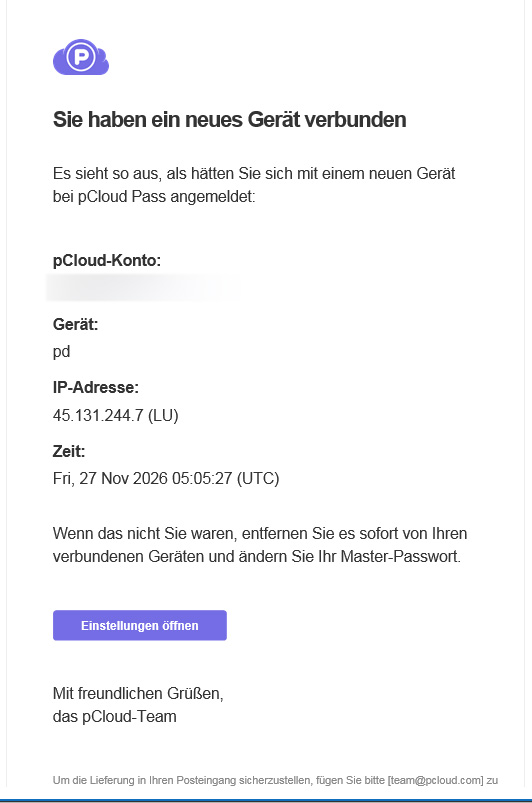
Source: BleepingComputer
Several customers reported receiving the alerts despite having two-factor authentication (2FA) enabled on their accounts. However, when customers checked their accounts for connected devices, some found no unfamiliar devices listed.
Other pCloud customers reported receiving the same notifications despite never having used the company’s password manager, including one who said the notification was sent to an email address associated with a pCloud storage account they had requested be deleted almost a year ago.
In response to the reports, pCloud confirmed its password manager had suffered a cyberattack, which the company says was quickly contained.
“A cyberattack targeting pCloud Pass occurred, which was promptly contained by the pCloud team,” reads pCloud’s statement.
“Unfortunately, a small number of pCloud Pass user email addresses were exposed and login attempts were made. Our system sends a notification automatically to each of these addresses.”
pCloud says the attack was isolated to its password manager and that its cloud storage services were not affected.
The company says that passwords, notes, and other information stored in pCloud Pass have not been compromised, explaining that the data is encrypted on customers’ devices and can only be decrypted using their master passwords.
However, pCloud did not disclose whether any encrypted password vaults were accessed or stolen during the attack.
This matters because threat actors who obtain encrypted password vaults could try to crack them offline without being subject to the service’s login rate limits or two-factor authentication protections.
This was demonstrated in the 2022 LastPass breach, when attackers stole backups containing encrypted password vaults.
Researchers later linked the breach to cryptocurrency thefts in which attackers are believed to have cracked weak or reused master passwords to access stored cryptocurrency wallet private keys and seed phrases.
A reader who contacted BleepingComputer also noted that the “Open settings” link in the email notifications pointed to passqa1.pcloud.com, which appears to be a quality assurance (QA) environment rather than the password manager’s production website.
BleepingComputer confirmed that the link pointed to the same hostname in a copy of the notification shared with us.
In its statement, pCloud also discussed how advancements in artificial intelligence are accelerating the discovery of software vulnerabilities, but did not specifically state that this was an AI-powered attack.
The company is also warning customers to watch for phishing attacks, stating that it will never ask for their master passwords or recovery words over email, phone, or chat.
The pCloud Pass incident is the latest in a series of cyberattacks impacting password managers this month.
Earlier in November, mSeven Software warned mSecure customers to change stored passwords, reset two-factor authentication, and remove passkeys after a hacker reportedly stole an encrypted customer database.
On Wednesday, 1Password disclosed a data breach after a threat actor compromised an employee’s GitHub account and deployed malicious code to the company’s backend services to steal customer data.
However, 1Password said customers’ password vaults and the encryption keys protecting them were not compromised.

Adaptive Security’s AI agents analyze email intent, context, and behavior to uncover phishing, business email compromise, and invoice fraud.
See what’s getting through with a 14-day read-only scan of Microsoft 365 or Google Workspace, with no MX changes.
Start your free email security scan.